One AI hands work
to another
A main session throws work to a helper session and carries on with its own, without waiting. This part exists only in Sunset Editor.
Call it directly and the caller stops
Calling another AI from inside an AI session works fine on its own. There is a terminal, after all.
codex exec "make me an icon"The problem is that the caller is frozen until that command finishes. For the five minutes Codex spends making an icon, Claude stands there doing nothing. So even with two AIs, work happens one at a time. You added windows to run several, and they do not actually run at the same time.
Leave a request, return immediately
The delegate command writes down "hand this to Codex" and finishes at once. The caller does not wait.
node scripts/delegate.mjs run codex "make me an icon"
→ accepted as task 3   (the command has already finished here)
Sunset Editor does the running. The app watches the folder you
have open, and when it finds a request it opens a terminal tab like Codex: Delegated 3
and runs it there.
Which means the progress is right there on screen. How far it got, what it changed, why it stopped — you watch it instead of guessing from a log. It runs in a mode that answers once and exits, so the finish is unambiguous too: the tab's process ends.
The main session leaves a request
One line. It prints a task number and ends at once. The main session carries on.
The app opens a tab
When it finds the request, that provider's terminal tab opens and the work runs there.
Both run at once
Main and helper each run in their own tab. Now having two AIs is finally worth something.
Decide up front who gets what
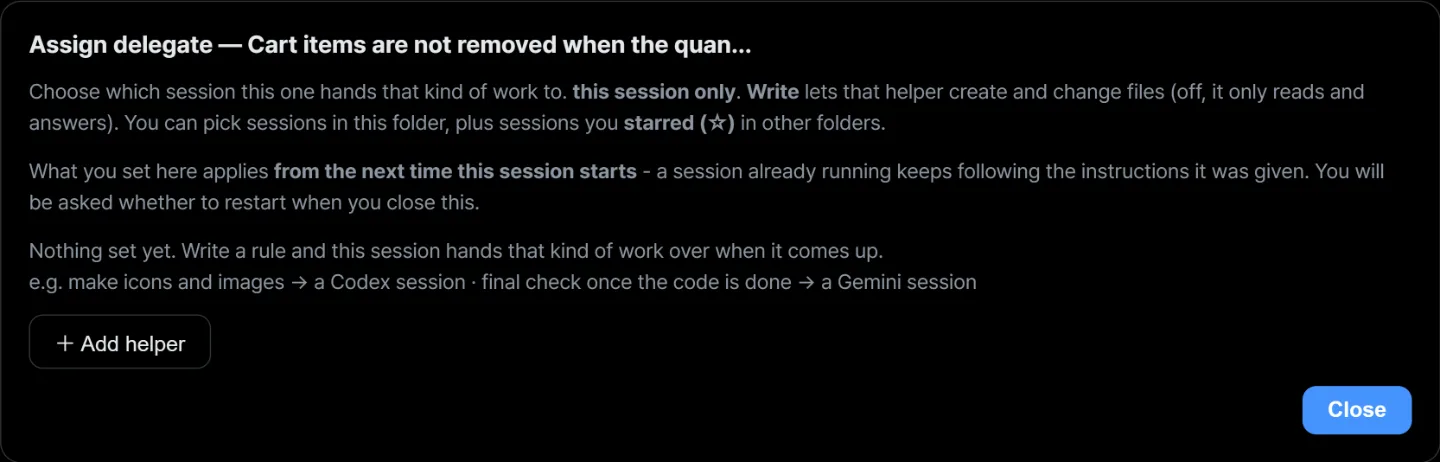
You do not have to say "this one goes to Codex" every time. Right-click a session, open Assign delegate, and write rules like "make icons and images → a Codex session", "final check once the code is done → a Gemini session".
Turn Write on and that helper can create and change files; leave it off and it only reads and answers.
What you set here applies from the next time the session starts — a session already running keeps following the instructions it was given. Closing the window asks whether to restart.
Providers attach helpers at different levels
| Provider | Attached per | Stored where |
|---|---|---|
| Claude | session | the app passes it as that session's instruction |
| Gemini | folder | that folder's GEMINI.md |
| Codex | folder | that folder's AGENTS.md |
Gemini and Codex have no place for per-session instructions, so it goes through the folder file. Every session of that provider in that folder therefore gets the same helpers. Only the section the app manages goes into the file; what you wrote yourself, and your harness, are left alone. Remove every helper and that section disappears too.
Try running two AIs at once
Install it, open a folder, right-click a session and write one rule.